User Offboarding scans every object in your org, shows you exactly what would move, and then transfers ownership – leaving a per-record audit log behind. No object checklist to maintain. No data leaves Salesforce.
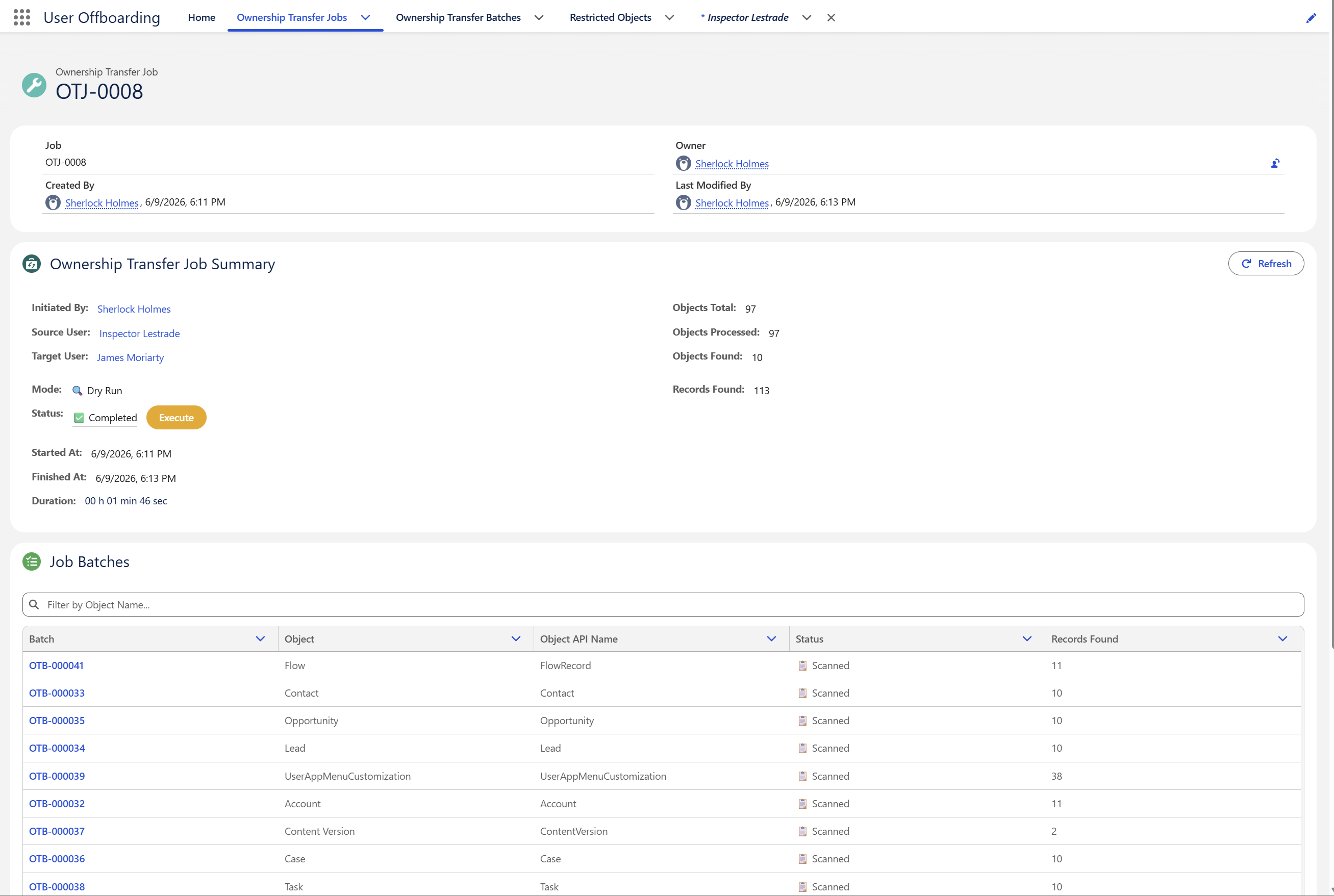
Illustration of a Dry Run in progress: the app scans all 97 transferable objects in the org and finds 10 objects holding 113 records owned by the departing user.
When someone leaves, they leave behind Accounts, Opportunities, Cases, open Tasks, files, and records in a dozen custom objects. The native mass transfer tool handles one of those per run – and it is on you to remember every object worth checking.
Pick an object, transfer, go back, pick the next. Anything you forget stays with the departing user – and you find out months later.
The app discovers every queryable object with an updateable owner, scans them all, and reports what it found – per object, per record. There is no list to maintain.
A Job is one transfer request from a source user to a target user. It is made up of Batches – one per object that actually held records. That structure is what you see throughout the app.
The app scans your org for every object that is queryable, accessible to you, and has an OwnerId field that can be read and updated. Everything else is skipped before the job begins.
A Dry Run scans and counts exactly what would change, without writing to a single record. Review it, adjust your exclusions, then commit.
Objects are handled one at a time in chained Apex batches, and large objects are chunked further – so the job completes reliably whatever the record volume.
Each object produces a batch record with counts and per-record detail. The job produces a downloadable CSV log of every record ID that changed hands, and every one that failed, with the platform's own error message.
A bell notification on desktop and mobile, plus an email summary with the per-object breakdown and a link straight back to the job. You do not have to watch it.
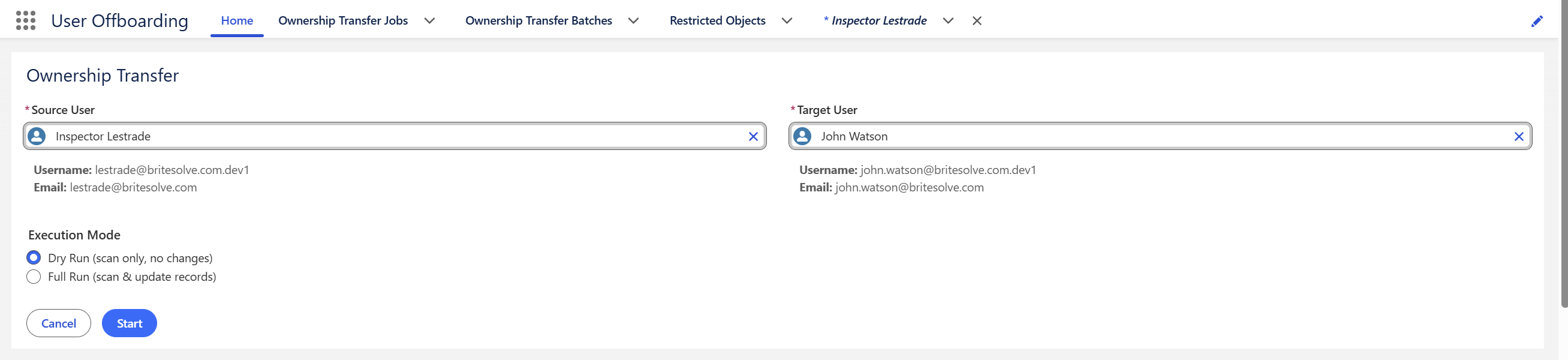
Ownership transfer cannot be undone from the app. So every job runs in one of two modes, and you choose which when you start it.
| Batch | Object | Object API name | Status | Found | Updated | Failed |
|---|---|---|---|---|---|---|
| OTB-000032 | Account | Account | ScannedUpdated | 11 | 11 | 0 |
| OTB-000033 | Contact | Contact | ScannedUpdated | 10 | 10 | 0 |
| OTB-000034 | Lead | Lead | ScannedUpdated | 10 | 10 | 0 |
| OTB-000035 | Opportunity | Opportunity | ScannedFailed | 10 | 5 | 5 |
| OTB-000036 | Case | Case | ScannedUpdated | 10 | 10 | 0 |
| OTB-000037 | Content Version | ContentVersion | ScannedUpdated | 2 | 2 | 0 |
| OTB-000038 | Task | Task | ScannedUpdated | 10 | 10 | 0 |
| OTB-000039 | User App Menu Customization | UserAppMenuCustomization | ScannedUpdated | 38 | 38 | 0 |
| OTB-000041 | Flow | FlowRecord | ScannedUpdated | 11 | 11 | 0 |
| OTB-000042 | Book | Book__c | ScannedType Error | 1 | 0 | 0 |
When a Dry Run completes, an Execute button appears on the job record. It opens a confirmation showing the source user, the target user, and the scan result – then creates a Full Run job and leaves the Dry Run intact as your record of the preview. The Full Run re-queries your data from scratch, so treat the preview as an accurate estimate rather than a guarantee.
Some standard objects would fail or cause unwanted side effects if transferred wholesale, so the app narrows what it selects for them.
The latest version of each file. The parent document is reassigned at the same time, so files move intact rather than being orphaned.
Open tasks only. Closed tasks are historical – reassigning them would misrepresent who did the work.
Non-child events that are either in the future or part of a still-active recurring series. Past events are left alone.
Quotes that are not currently syncing with an opportunity.
Records that are not Activated.
Draft articles only. Published and archived versions are not reassigned.
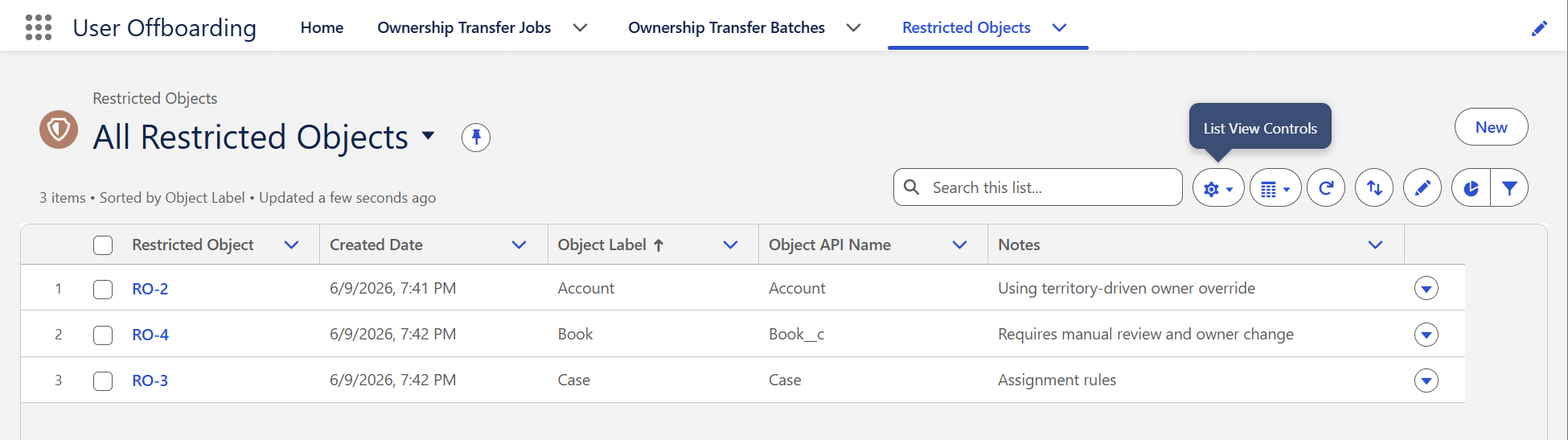
Your exclusion list. Anything on it is never scanned and never updated. Add sensitive or system objects by API name before you run – and when the app hits an object whose owner is inherited from a parent, it adds that object itself, with the platform error stored in Notes. The list gets smarter with use.
Every one of them appears in the batch Failures tab with the platform's own message, and in the CSV log. Nothing fails silently.
A running job has a Stop button. The confirmation tells you how far it got and how many records have already moved. It stops at the next safe point – and because the source user now owns only what was not reached, starting a new job picks up exactly where the stopped one left off.
When a job finishes, the app generates a record-level CSV and attaches it to the job. It documents exactly which records moved, when, and at whose instruction – the artefact to keep for compliance.
| Log ID | Source user | Target user | Object API name | Record ID | Status | Error |
|---|---|---|---|---|---|---|
| OTB-000032 | Inspector Lestrade | James Moriarty | Account | 001WI00000A7bQxYAJ | Updated | |
| OTB-000035 | Inspector Lestrade | James Moriarty | Opportunity | 006WI00000B2kLmYAN | Updated | |
| OTB-000035 | Inspector Lestrade | James Moriarty | Opportunity | 006WI00000B2kLnYAN | Failed | FIELD_CUSTOM_VALIDATION_EXCEPTION: Owner must hold the Sales Manager role |
| OTB-000037 | Inspector Lestrade | James Moriarty | ContentVersion | 068WI00000C4pRtYAP | Updated |
A managed package, installed from AppExchange at no cost. It adds an app with four tabs, two custom objects, and one permission set.
Not from within the app – there is no rollback. That is precisely why Dry Run exists. If you must reverse one, you can run a job in the opposite direction, but it will move every record the second user now owns, not only the ones you just transferred. The CSV log gives you exact record IDs for a targeted correction.
No – and you should not. Records can only be queried against an existing user. Run the transfer while they are still active, confirm the results, then deactivate.
Indirectly. Add every object you do not want moved to Restricted Objects. The app always processes all remaining transferable objects – there is no per-job object picker.
Yes. Files are transferred via ContentVersion, and the parent document is reassigned at the same time, so files move intact rather than being orphaned.
No. The app is 100% native. All processing happens inside Salesforce and no external service is called.
Yes. The app exposes a Transfer Record Ownership invocable action taking a source user ID, a target user ID, and a dry-run flag. It processes one request at a time – bulk invocation is not supported.
Objects Total counts every object in your org that could hold owned records. Objects Found counts only the ones where the departing user actually owned something. A job reporting 10 objects found out of 97 is working exactly as intended.
It depends on your object count and record volume – objects are processed one at a time in chained Apex batches, so a large org takes a while. You do not need to watch it; the bell notification and email summary arrive when it finishes.
User Offboarding is free because it solves a problem we kept solving by hand for clients. The paid work looks like this – led by certified architects with enterprise domain expertise, in two-week sprints with no surprises at go-live.
Flows, triggers, and orchestrations that remove repetitive work and human bottlenecks.
Lightning Web Components, Apex back-ends, and Experience Cloud portals that feel native.
Salesforce connected to ERP, HRIS, and proprietary systems through robust APIs and middleware.
Dashboards, custom report types, and real-time KPI tracking leadership can act on.
Shield encryption, field-level security, and audit trails for regulated industries.
Administration, release management, and optimisation retainers as your org evolves.
It costs nothing, it changes nothing until you tell it to, and it will find records you had forgotten about.